Ok, I loaded the scene you posted over on ProSoundWeb. This shows DCA assignments and it also shows your feedback issue. Channels 23/24 are sending to Subgroups 15/16 via it's channel sends while at the same time they are being fed by subgroups 15/16..... Turn off in Channel 23/24 the Sub Group send to subgroups 15/16. I thought you said there were no sends to those Buses when we talked before?
Doug
That's weird, because I used the exact same file on ProSoundWeb... anyways, thank you for your help - it's a mistake that Ch23/24 are sent to Subgroup 15/16.
That's weird, because I used the exact same file on ProSoundWeb... anyways, thank you for your help - it's a mistake that Ch23/24 are sent to Subgroup 15/16.
I put this over at ProSoundWeb as well regarding doing a Card Recording.
I hope I understand your question correctly.
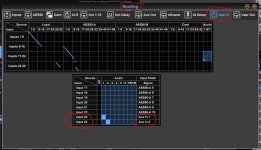
I don't have my desk right in front of me so from memory.... The Card Records Inputs not channels. In the Routing screen bottom Right there is a Input box. Turning the knob just below it, the first one on the right you can switch between Record and Play patching. When you start a recording with your Live Card it defaults to the Record input patching. You have your inputs in the Record Mode set to User in. You don't have any of these User In inputs set to any Aux In channel (s) you want to record so the Card can't record them. In your User In section enter Aux 1-2 if you want to record those inputs to 2 free channels on the desk. The Live Card records Inputs not where you soft patched an input to. As you sent some inputs to a Sub Group and soft patched that Sub Group to a pair of channels the Card Can't record the channel inputs and where they are soft patched to. Do you need to record more than 2 Aux inputs at a time or do you have several free channels when recording? As an example if you, in User In put the Aux Channels 1-2 to go to the Desk Channels 23 and 24 then I believe you can then record those channels like all the other ones you are recording, as the Card is set to Record "User In" on your scene. The down side is if you want to record Aux in 3-4 you have to go to User In and put Aux 3-4 in Channels 23/24. (or just put whatever you want to record into Aux 1-2) Again the Live Card records Inputs not the Channel on the desk the input is sent to. In the Attachment below I put Aux 1-2 inputs to feed channels 23-24 in the User In section. The Card is set to record User In in your scene so it should record Aux 1-2 in Card Channels 23-24. It would be easy to give this a try to see. Hopefully this is a work around for you.