

Philips Color Kinetics LED control with iPhone App

Jeremy Flint

Freshman
Jan 13, 2012
7
0
0
We have a Philips Color Kinetics installation in our new building. We are using a PDS-150e to control 2 nodes of 72 LED lights, and we are controlling it using the ColorDial Pro over a POE cisco switch.

We want to have the ability to use the Remote Keypad iPhone app to control the ColorDial, and the instructions say that all you have to do is "add a wifi access point to the same network as the ColorDial", but it doesn't appear to be that easy.

Does anyone have experience setting this up?
 
Re: Philips Color Kinetics LED control with iPhone App

First off, are you getting any error messages in the application? And if you are using a home wireless router, is the Ethernet cable plugged into one of the LAN ports, and not the Internet/WAN port?

There are a couple ways to configure this system. The first is to set the AP to be a "dumb" access point. No DHCP, no routing functionality, nothing. Set a static 10.x.x.x IP address on the i-device (presuming it lets you, I don't remember if it does).

Alternatively, you can enable the DHCP server on the access point. The data from the Keypad App is broadcast, so IP address range *shouldn't* matter, but it's safest to make sure that the DHCP server and all the devices on the network are set to be in the same subnet (10.x.x.x is safest, but 192.168.x.x also works just fine).

Let me know if you have further questions or issues.

-Rob (Philips Color Kinetics)
 
Re: Philips Color Kinetics LED control with iPhone App

When i connect my iPhone to the access point and launch the app, I see a green message at the bottom of the app, so it is definitely connecting to the AP.

I do have the cable from the switch connected to the " internet" port on the wifi rouen and not one of the regular WAN ports. I also had it set to use DHCP but changed the ip scheme to match that of the colordial (10.x.x.x).
 
Re: Philips Color Kinetics LED control with iPhone App

When i connect my iPhone to the access point and launch the app, I see a green message at the bottom of the app, so it is definitely connecting to the AP.

I do have the cable from the switch connected to the " internet" port on the wifi rouen and not one of the regular WAN ports. I also had it set to use DHCP but changed the ip scheme to match that of the colordial (10.x.x.x).

Start by moving the cable connecting the switch to the access point to one of the LAN ports. This sounds like your router is functioning correctly as a router and not passing the broadcast traffic outside the local network (LAN ports)
 
Re: Philips Color Kinetics LED control with iPhone App

Start by moving the cable connecting the switch to the access point to one of the LAN ports. This sounds like your router is functioning correctly as a router and not passing the broadcast traffic outside the local network (LAN ports)

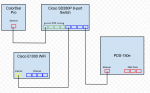
Here is a diagram of how I currently have it connected. Also a note that this is a closed network. There is nothing else connected to it (no internet, etc).

20120116-ujiuxrkcyi15fyh5gj6pxrwnq.png

Just to be clear, you are saying on the E1000 wifi AP to move the connection from the Cicso POE switch from the yellow "internet" port over to one of the blue "ethernet" ports?

Also, should I disable DHCP on the wifi as well?
 
Re: Philips Color Kinetics LED control with iPhone App

Here is a diagram of how I currently have it connected. Also a note that this is a closed network. There is nothing else connected to it (no internet, etc).

View attachment 2877

Just to be clear, you are saying on the E1000 wifi AP to move the connection from the Cicso POE switch from the yellow "internet" port over to one of the blue "ethernet" ports?

Also, should I disable DHCP on the wifi as well?

Yes, move the cable from the yellow port to the blue 'Ethernet' port.

There is no reason to disable DHCP on the router, but as Rob said, distribute IP addresses in the 10.x.x.x range.