X32 - XControl, Routers and WiFi

I'm using the second generation AirPort Express and it has both a WAN and LAN port. The LAN port connects to the X32.

Interestingly, I am able to connect the iPad to the X32 maybe 1 out of 25 attempts. For that to occur, I unplug the APE from the X32, wait a few seconds, and then plug it back in. After repeated attempts, the iPad may connect ... but not reliably.

I use the same APE with a PreSonus StudioLive setup and it functions nicely. In that setup, it's communicating wirelessly with a MacBook Pro and several iPads, iPods, and iPhones with no issue.

It seems that there could be a problem with your cable connection, either the x32, cable or airport. You state that there are no problems when running it together with the SL, MBP and handhelds.

Have you tried a to connect the x32 to the MBP directly with the same Ethernet cable you use to connect the APE and run xcontrol without dropouts? If that works, the cable and Ethernet interface in the x32 should be ok. Then there might be a problem in the APE.
 
re: X32 - XControl, Routers and WiFi

Have you tried a to connect the x32 to the MBP directly with the same Ethernet cable you use to connect the APE and run xcontrol without dropouts? If that works, the cable and Ethernet interface in the x32 should be ok. Then there might be a problem in the APE.

Yep, can connect the X32 direct to my MBP without issue, and also the Airport Express to the MBP through the ethernet port, and I get a connection... so, i'm pretty sure it's a configuration problem, not an actual problem with the port...

Can anyone that has it working maybe post some screengrabs of their AE settings screens?
 
re: X32 - XControl, Routers and WiFi

Same here ... except it may randomly connect (1 in 20 attempts) if I keep unplugging and reconnecting the AirPort Express to the X32.

I borrowed my friend's old Cisco router and everything worked perfectly. So ... the problem has to be in the AirPort Express.

When connecting the APE, the network light on the back of the X32 blinks for 10 seconds before going solid.

When connecting the Cisco router, the network light on the back of the X32 goes solid the moment it is plugged in.
 
Re: Attempting to Connect .... yawn ....

Arrrrrrr .... I'm having the same problem, but have not stumbled upon a reliable solution.

The iPad will connect maybe 1 out of 25 attempts. I'll unplug the AirPort Express from the X32, count to 10, plug it back in, and maybe the iPad will connect. Most likely it won't.

Once connected, I can switch to Work Offline and readily re-connect.

I've tried the Static IP that Dan suggested, but no consistency with connecting. I've set the Gateway to 0.0.0.0 but no luck.

The AirPort Express (2nd gen) works nicely with my PreSonus & the iPad, so I don't think the problem is in the router.

That it will connect tells me that there's a gremlin lurking somewhere. :x~:-x~:mad:

So I had your problem, or a similar one, this afternoon. None of 3 iPads would connect to a console (different console and different Airport- the new generation Express).

Finally I restarted the console, and all three iPads connected instantly.

Go figure.
 
Re: Attempting to Connect .... yawn ....

So I had your problem, or a similar one, this afternoon. None of 3 iPads would connect to a console (different console and different Airport- the new generation Express).

Finally I restarted the console, and all three iPads connected instantly.

Go figure.

Still having those issues here as well. Need a solid workaround.
 
Re: Attempting to Connect .... yawn ....

Yeah, I have been. I really only need it in most situations to allow easy one man monitor setting. I like faders. Mixed some stuff on my 48 channel analog board and still really like being able to grab multiPle controls at once.

Possibly unlike your situation, once I restarted, the iPads stayed connected solidly for the next couple hours, until I turned them off.

AFAIC, restarting (or starting) the console with the Airport connected to it after being powered up is the solution.

Until I find out that doesn't work, either....

Coincidentally, I did my first show Friday night solely using iPads to mix from. It was in a theater that I have never enjoyed working in, largely because everything at the mix position has to be carried up stairs, and the snake run is not elegant (although not horrible).

This show was a breeze on the iPads. It was only 7 mics, all acoustic instruments, low SPL and no monitors, and it was really fun to do the soundcheck from any seat I wanted to listen from and be able to adjust as needed instantly. Might post pics in the megathread.

The only odd thing is that I was on a gen1 and a Retina, and the gen1 would freeze/pause like clockwork every 60 seconds or so for a half a second, and then go right back to where it was. The Retina would sporadically do the same thing, but much less regularly and never at the same moment as the gen1. The Airport was an earlier one with the built in two prong AC plug, and I've had suspicions about it for a while, although it works in the shop very well. Didn't somebody in the other thread talk about this generation of Airport being only 2.4 Ghz, while the newer Express is simultaneously 2.4 and 5?

There were at least 3 visible wifi networks in the room (high school auditorium), and I wondered if that had something to do with it. Didn't yet download Jon's recommended app, but will after writing this. I've got another show in the same place this next Friday with a B.E., so I'll have nothing to do and can scan to my heart's content. He is refusing to mix on iPads, so I'll just be in scan mode. And I was going to try the newer Airport and see if it made a difference in the freeze/pauses.
 
Re: Attempting to Connect .... yawn ....

... I was going to try the newer Airport and see if it made a difference in the freeze/pauses.

Dan ... I have the new dual band (2nd gen) AirPort Express and it's the one giving me fits.

I have tried numerous setting combinations all with the same result.

On occasion, the iPad may readily connect. Most often it will not. The other day I got a connection 4 times over the course of two hours.

I would unplug the router from the X32, wait, then plug it back in. Most often the Attempting to Connect message remained.

Once connected, however, I could switch to Work Offline and easily re-connect to Work Online at will.

It obviously has something to do with the handshaking between the AirPort Express and the X32.

I borrowed a friend's old Cisco router yesterday and it connected perfectly every time it was plugged in, disconnected, plugged in again.

When I plugged in the Cisco, the network light at the connector on the X32 immediately came on solid.

When I plug in the AirPort Express, the network light blinks for about 10 seconds before going solid.

I am still puzzled that, once handshaking occurs between the AirPort Express and the X32, I can Work Offline and reconnect to Work Online at will ... until the router is unplugged from the X32 and then plugged back in.

Quite frustrating to be so close.
 
Re: Attempting to Connect .... yawn ....

I thought all things APPL "just worked." /cynicism

FWIW, I have a new-ish Cisco router that defies being configured unless it's connected to the internet. Fucking waste of money, time, and silicon.
 
Re: Attempting to Connect .... yawn ....

The only odd thing is that I was on a gen1 and a Retina, and the gen1 would freeze/pause like clockwork every 60 seconds or so for a half a second, and then go right back to where it was. The Retina would sporadically do the same thing, but much less regularly and never at the same moment as the gen1. The Airport was an earlier one with the built in two prong AC plug, and I've had suspicions about it for a while, although it works in the shop very well. Didn't somebody in the other thread talk about this generation of Airport being only 2.4 Ghz, while the newer Express is simultaneously 2.4 and 5?

I'm having what appears to be the same problem. I've got a 2.4Ghz Airport Express and ipad2. It does the same pause/dropout but it seems to be random and not every 60 seconds like clockwork. It also doesn't seem to be related to distance from the router.
 
Re: Attempting to Connect .... yawn ....

Following up on my last post here:

Did two more shows, one mixing from iPads and one as a provider, not mixing.

Both times, I took a hub and connected both Airports (old built in AC plug and new Express) to compare performance, and felt like I had a reliable method of getting a network connection:

-power up Airports and connect to the hub, hub connected to powered-down X32;
-iPads on, connected to Airport (Gen1 to old Airport, Retina to Express);
-power up X32.

Instant network connections to console, both days.

The day I mixed from iPads there was a couple hours between end of soundcheck and beginning of show, so I spent it looking at the connection stability over time.

Sure enough, the Gen 1 went back to its connection drop every 60 sec like clockwork, while the Retina was solid. I made a couple of movies with stopwatch visible to show time, and showing the connection symbols of the XiControl on both iPads. Unfortunately, .mov does not seem to be a supported format here, so you can't see them. If you could, you'd see what I just described.

Switching the Gen1 over to the new Airport eliminated the dropouts. Switching the Retina over to the old Airport surprisingly DIDN'T result in dropouts and IIRC I couldn't get dropouts to occur again. I watched things for 20 min or more and didn't have any dropouts, and lost interest and surfed the web for the remainder of the dead time. Mixing the simple talking head show was easy and fun on an iPad.

The second show was in the same place as my earlier post, and I had a laptop with the WiFi Explorer software that Robert recommended ITT.

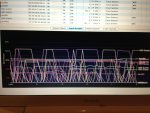
I said in the earlier post there were at least three WiFi networks present? There were TWENTY THREE visible! Plus my two which were invisible, since I have them set to be not visible. Although this may save them from attack by iPhones, it also makes it impossible to view their performance using this software, and I don't quite know how to balance the good and bad in that.

Anyway, here are some pictures of the computer screen showing what was going on in the room:
IMG_0314.jpg

The first pic shows the cacophony of wireless networks visible from this auditorium. There were triplets of networks in the 2.4Ghz range
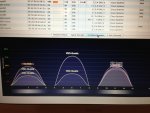
IMG_0315.jpg

and a few in the 5Ghz range

IMG_0316.jpg

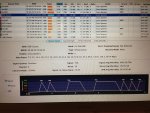
Regarding the regular dropouts on mine, there were a bunch of networks that had the same kind of pattern, and here is one of them
IMG_0320.jpg

It must be possible to set up a network to do this automatically, or else it routinely randomly occurs. Why would you want this, or why would you put up with its prevalence if you didn't want it? It is a mystery.

The BE was not at all interested in the iPads, so I put them away and so did not monitor dropouts this day. While I was looking, though, they were fine, but were about 18" from the Airports and so had pretty strong signals.

 
Re: Attempting to Connect .... yawn ....

Some interesting information there, Dan.

I've had to put my AirPort Express on the shelf for now and am using a borrowed Cisco Linksys router. The APE just would not connect reliably. However, when it did connect, it was good to go with no dropouts.

I have corresponded with Chase McKnight and he stated that they were ordering an AirPort Express for their facility. It will be interesting to see what results they have.
 
Re: Attempting to Connect .... yawn ....

How are you placing the AiEx?

if you place it close to a metal surface or similar condition you may create a feedback loop that kills the signal to/from the router.

I.e. placing the router on a table that have a metal sheet or perhaps metal bars in close proximity to the router will degrade the signal severely. There are tables with metal bar around the edge of the table if you place it to close to the edge. Putting the router on top of a rack case that also contains metal close to the router.....

I hope that you see where I'm aiming at? Just because you have a clear line of sight doesn't mean that the builtin antennas of the router aren't in some bad position. Router with external antennas are less prone to the metal surfaces but they will still suffer one way or another, only not noticable for the end user...
 
Re: Attempting to Connect .... yawn ....

I've had to put my AirPort Express on the shelf for now and am using a borrowed Cisco Linksys router.

At the risk of crossing some kind of line, would you want to send it to us and I could see if my kid can figure out what is going on? I just got some more AE's, and he'll be coming over at some point in the next couple weeks (I hope) to configure them, and he could look at yours and see if there's anything obvious*. I can set it up with my consoles and see if yours acts like mine or differently.

PM me if you're interested; I don't see why yours should behave differently than mine, and am curious. I'm going to get him to try to figure out why my older one drops out every 60 seconds.

* Obvious to him; I wouldn't have a clue.
 
Re: Attempting to Connect .... yawn ....

I keep my 23 year old around for things like that as well. I have always said that you don't need to know all the answers as long as you do know who to ask.
 
Re: Attempting to Connect .... yawn ....

I keep my 23 year old around for things like that as well. I have always said that you don't need to know all the answers as long as you do know who to ask.

I believe that Henry Ford has been quoted as saying much the same, only stated something like, "I don't need to clutter up my brain with all that stuff. I pay people to know that so I can use my brain for thinking."
 
Last edited:
Re: X32 - XControl, Routers and WiFi (revived)

Hey all,

I figured instead if starting a whole "X32" thread I'd pose my problem here.

I'm using an Airport Express, not the newest version, but the one right before it. Once I set my ipad to a static IP I've had no problem getting my ipad to connect. The issue is I cannot get more than one device to connect via the Airport express no matter what I do. Any thoughts on why this might be?

Thanks!
Phil
 
Re: X32 - XControl, Routers and WiFi (revived)

Hey all,

I figured instead if starting a whole "X32" thread I'd pose my problem here.

I'm using an Airport Express, not the newest version, but the one right before it. Once I set my ipad to a static IP I've had no problem getting my ipad to connect. The issue is I cannot get more than one device to connect via the Airport express no matter what I do. Any thoughts on why this might be?

Thanks!
Phil

Hi Phil,

Please define what you mean by "cannot get more than one device". What kind of device?

Thanks,
Dan